homelab.one - Will Lüften make me a platform engineer
small overview of what is below
hardware
- IKEA stuff
- cheap tasmota relay (sonoff)
- cheap unknown 433mhz sensors motion
- cheap sonoff 433mhz gateway (433mhz -> mqtt)
- surface pro 4 (i7, 16gb of ram, 512gb of ssd)
actual implementation
- flame (give the author a star ⭐️)
- zigbee2mqtt
- mosquito
- node-red
- influxdb
- grafana
missing pieces
- backups
- secrets
next steps
- repo (actually there is one, but just for backup purposes -> temp_collector)
- k3s (fluxcd + k3s + some gitops exercises)
Intro
So overall below there is nothing more extraordinary than you can find over internet. However it is always good to write down your journey and maybe someone will find it useful.
So this small writing is about my not so first attempt to get into homelab hobby with not so smart home automation.
Why not so small automation? Because I usually like to understand what is happening behind the scenes. Installing Home Assistant, adding few sensors and calling it a day would be a nice activity, but having better visibility into how my data is collected and is getting me more excited.
How I even got into idea?
So in general for time being I’m living in Germany. Common problem in apartments here, even every native German will tell you that they never had this problem, is a mold and humidity in apartments 😅
Lüften
To avoid mould you have to follow very specific procedure, locals are doing religiously ;)
When I’m saying religiously, I mean… there is a government page explaining how to approach the problem 🤯
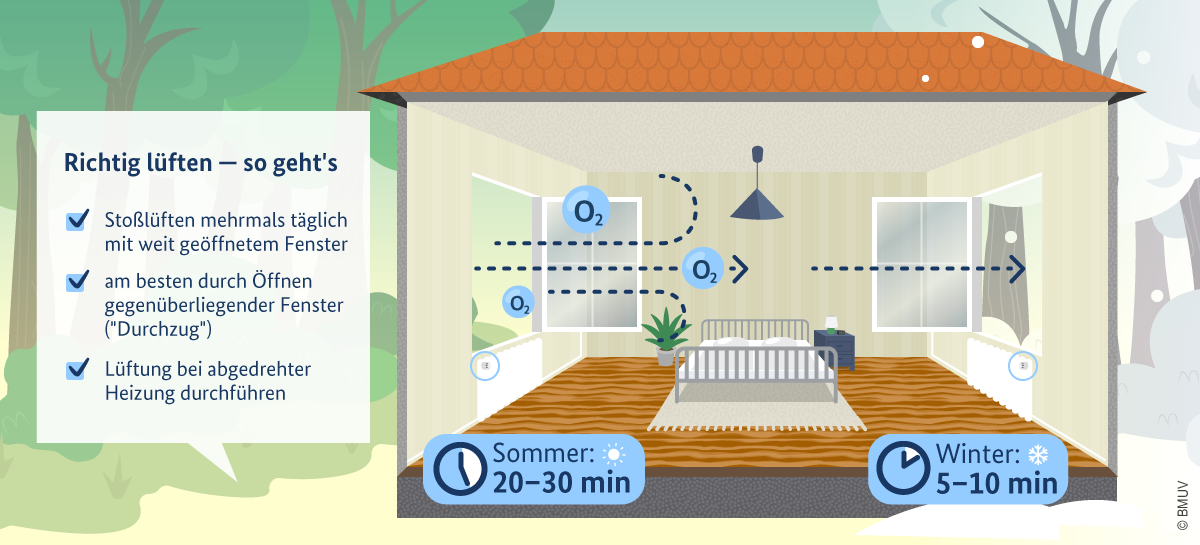
And since I live in very old building (built in 1870s if I’m not mistaken), the problem is rather annoying. Even more annoying when my landlord started questioning if I’m even doing what I should do to keep humidity level in my apartment on safe level. (you can find some good stories on YT or IG explaining how confusing the problem is to expats here)
But to the point.
I needed first to see the correlation between weather conditions outside and what is happening in my apartment.
As well as I also wanted to proof to my beloved landlord that Lüften is happening here for real. And I’m taking it as serious as I can 😎
Hardware
LYWSD03MMC
Internet is flooded with those devices :) It is cheap, highly available and.. you can swap firmware so device instead of using bluetooth LE uses zigbee. (more info here)
Bonus point does not transfer your data through China
Over years of buying random stuff from Ali for DIY projects that I will “definitely finish next weekend” I ended up with few of them. Initially some years ago I had rpi running small shell script collecting data from those devices over BLE but it was draining battery within 2 months.. so not really ideal.
cc2531
Once I have temp / humidity sensors I needed to somehow collect data into single place. So what is looking as current standard in DIY home automation is… zigbee2mqtt.
Easy!
But first somehow you need to be able to receive zigbee. As always our friends from behind of Great Wall are coming with some cheap toys :) I would personally not use again the cc2531 as it is fairly limited. What I mean by that, it can only receive and can not behave as a router in your mesh.
So in general I would simply go for some off the shelf zigbee2mqtt solution, sonoff seems to be quite popular.
However, after going through all the hustle documented here, we are ready to collect this data. Because now we are receiving zigbee, and broadcasting it over our normal wifi network using mqtt protocol.
2025-12-08 Actually recently migrated to ZBDongle-E 3.0 USB Dongle Plus
mqtt and mosquitto
So to make data fly over our wifi we need some mqtt broker :) Here to the rescue comes mosquitto.
Small piece of software that can run on literally anything, that enable us to subscribe to any topic that is being present on the broker.
zigbee2mqttI’m actually planning to move to separate device… so I guess I will just have pi zero w running single docker container. This way I do not have anything in my upcoming k3s setup interacting with usb hardware. To keep stuff simple.
… or I have to dig into mdsn zeroconf discovery topic
IKEA stuff
You know IKEA, right? The one with meatballs and instructions that make you question your life choices. Well, they also have smart home stuff that is surprisingly good and cheap.
What I’m using:
- TRETAKT - smart plugs. Nothing fancy, but works solid with zigbee2mqtt
- RODRET - dimmer switches (cheaper than STYRBAR and I can play with dimming events 😎)
- STYRBAR - remote control for lights
- PARASOLL - door/window sensors. This one is my proof to landlord that windows are being opened!
All those devices speak zigbee, so they join nicely to my mesh.
433mhz sensors
Before going full zigbee I also bought some cheap 433mhz motion sensors and a sonoff 433mhz gateway. Gateway runs tasmota firmware and publishes everything to mqtt. Not ideal but hey, it was cheap and it works. At least for bathroom window sensor where I didn’t want to spend money on PARASOLL :)
Surface Pro 4
So where does all this run? On a Surface Pro 4 that was collecting dust in my drawer. i7, 16GB RAM, 512GB SSD. Bit overkill for this project but I had it laying around.
Running Pop!_OS with Cosmic UI just for fun. Works surprisingly well for a Surface device. Especially after installing linux-surface kernel.
Current Stack
1
2
3
4
5
6
7
8
9
10
11
12
13
14
15
16
17
18
19
20
21
22
23
24
25
26
27
28
29
30
31
32
33
34
35
36
37
38
39
40
41
42
43
44
45
46
47
48
49
50
51
52
53
54
55
56
57
58
59
60
61
62
63
64
65
66
67
68
69
70
71
72
73
74
75
76
77
78
79
80
81
82
83
84
85
86
87
88
89
90
91
92
93
94
95
services:
  zigbee2mqtt:
    image: koenkk/zigbee2mqtt
    container_name: zigbee2mqtt
    environment:
      - TZ=Etc/UTC
    volumes:
      - ./zigbee2mqtt/config/:/app/data
      # - ./zigbee2mqtt/data:/app/data
      - /run/udev:/run/udev:ro
    devices:
      # - /dev/ttyACM0:/dev/ttyACM0
      - "/dev/serial/by-id/usb-Itead_Sonoff_Zigbee_3.0_USB_Dongle_Plus_V2_b2716f8592c2ef1191f1c6138148b910-if00-port0:/dev/ttyUSB0"
    depends_on:
      - mosquitto
    ports:
      - 8080:8080
    restart: always

  mosquitto:
    image: eclipse-mosquitto
    container_name: mosquitto
    ports:
      - 1883:1883
    volumes:
      - ./mosquitto/config:/mosquitto/config
      - ./mosquitto/data:/mosquitto/data
      - ./mosquitto/log:/mosquitto/log
    restart: always

  node-red:
    build: ./node-red/
    container_name: node-red
    # network_mode: host
    environment:
      - TZ=Etc/UTC
    ports:
      - 1880:1880
    volumes:
      - ./node-red/data:/data
    depends_on:
      - mosquitto
      - influxdb
    restart: always

  influxdb:
    image: influxdb:2
    container_name: influxdb
    ports:
      - 8086:8086
    volumes:
      - ./influxdb2/data:/var/lib/influxdb2
    environment:
      - DOCKER_INFLUXDB_INIT_MODE=setup
      - DOCKER_INFLUXDB_INIT_USERNAME=${DEFAULT_USERNAME}
      - DOCKER_INFLUXDB_INIT_PASSWORD=${DEFAULT_PASSWORD}
      - DOCKER_INFLUXDB_INIT_ORG=${INFLUXDB_ORG}
      - DOCKER_INFLUXDB_INIT_BUCKET=${INFLUXDB_BUCKET}
      - DOCKER_INFLUXDB_INIT_ADMIN_TOKEN=${INFLUXDB_TOKEN}
      - INFLUXDB_DB=sensordata
      - INFLUXDB_ADMIN_USER=admin
      - INFLUXDB_ADMIN_PASSWORD=adminpassword
    restart: always

  grafana:
    image: grafana/grafana
    container_name: grafana
    ports:
      - 3000:3000
    volumes:
      - ./grafana/data:/var/lib/grafana
      - ./grafana/provisioning:/etc/grafana/provisioning
    environment:
      - GF_SECURITY_ADMIN_USER=${DEFAULT_USERNAME}
      - GF_SECURITY_ADMIN_PASSWORD=${DEFAULT_PASSWORD}
      # - INFLUXDB_USERNAME=${DEFAULT_USERNAME}
      - INFLUXDB_URL=${INFLUXDB_URL}
      - INFLUXDB_BUCKET=${INFLUXDB_BUCKET}
      - INFLUXDB_TOKEN=62gms_7z5__wdtm2lKIZ3oXilda3NExC47W0bPlKGro0wz79J4a9Y9W2lKwgIkUIZlp1GXipFqgp49A-Z7EzlA==
      # - INFLUXDB_ORG=${INFLUXDB_ORG}
    depends_on:
      - influxdb
    restart: always
  flame:
    image: pawelmalak/flame
    container_name: flame
    volumes:
      - ./flame/data:/app/data
      - /var/run/docker.sock:/var/run/docker.sock
    ports:
      - 5005:5005
    environment:
      - PASSWORD=password
    restart: unless-stopped
Everything runs in docker compose. Simple, works, easy to backup. Here is what I have:
flowchart TB
    subgraph surface["Surface Pro 4 (Pop!_OS)"]
        subgraph containers["Docker Containers"]
            zigbee2mqtt["zigbee2mqtt<br/>:8080"]
            mosquitto["mosquitto<br/>:1883"]
            nodered["node-red<br/>:1880"]
            influxdb["influxdb<br/>:8086"]
            grafana["grafana<br/>:3000"]
            flame["flame<br/>:5005"]
        end
    end

    zigbee2mqtt --> mosquitto
    mosquitto --> nodered
    nodered --> influxdb
    influxdb --> grafana
Data flow
- Sensors broadcast zigbee signals
- ZBDongle receives them, zigbee2mqtt translates to mqtt messages
- Mosquitto broker distributes messages to subscribers
- Node-Red picks up messages, transforms them, stores in InfluxDB
- Grafana displays pretty charts
For 433mhz sensors path is a bit different - sonoff gateway with tasmota publishes directly to mosquitto.
Node-Red flows
I have few flows running:
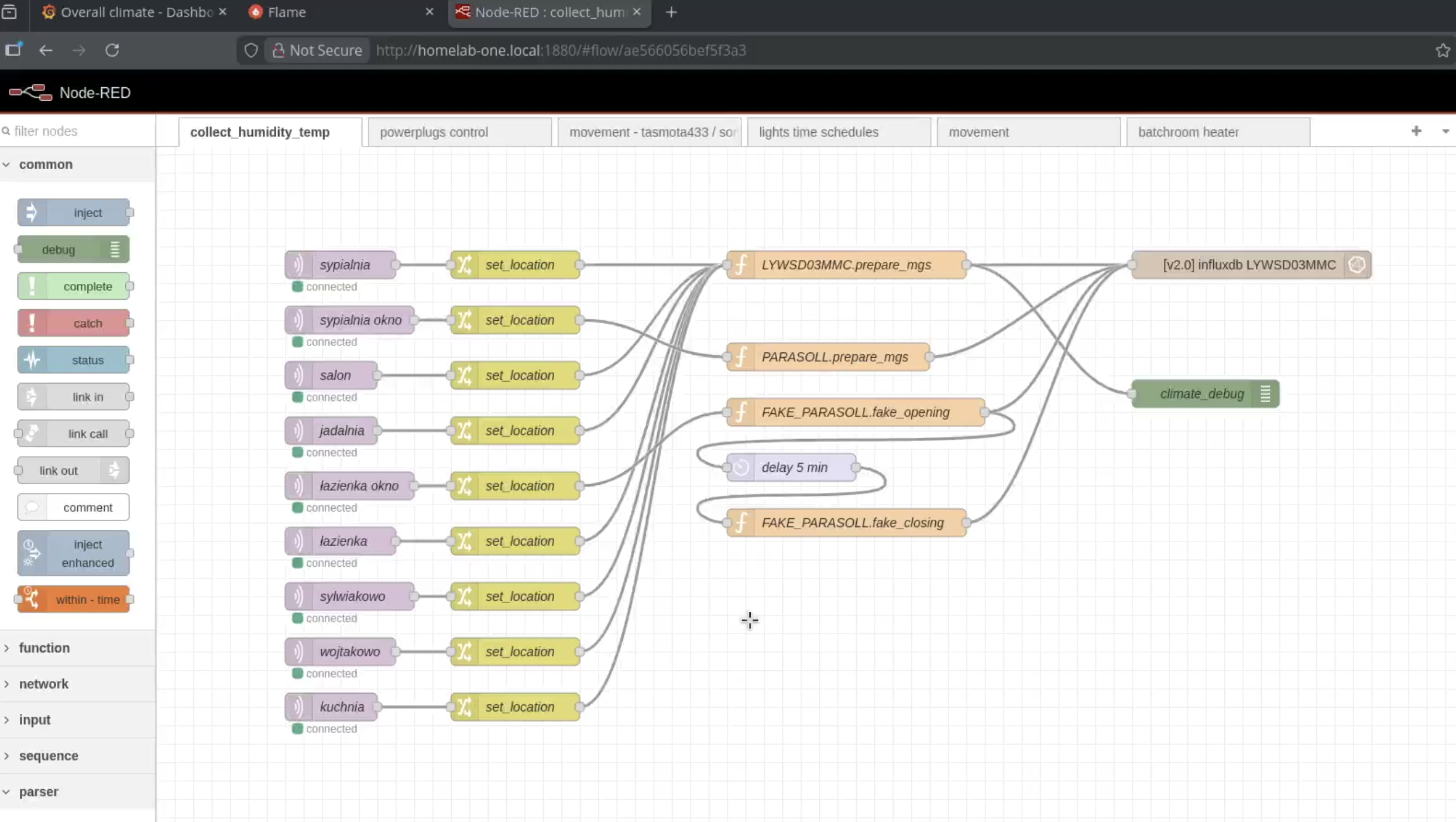
- collect_humidity_temp - main flow that grabs data from all LYWSD03MMC sensors and stores in influxdb. Each sensor has its location tag (sleeping_room, living_room, bath_room, etc.)
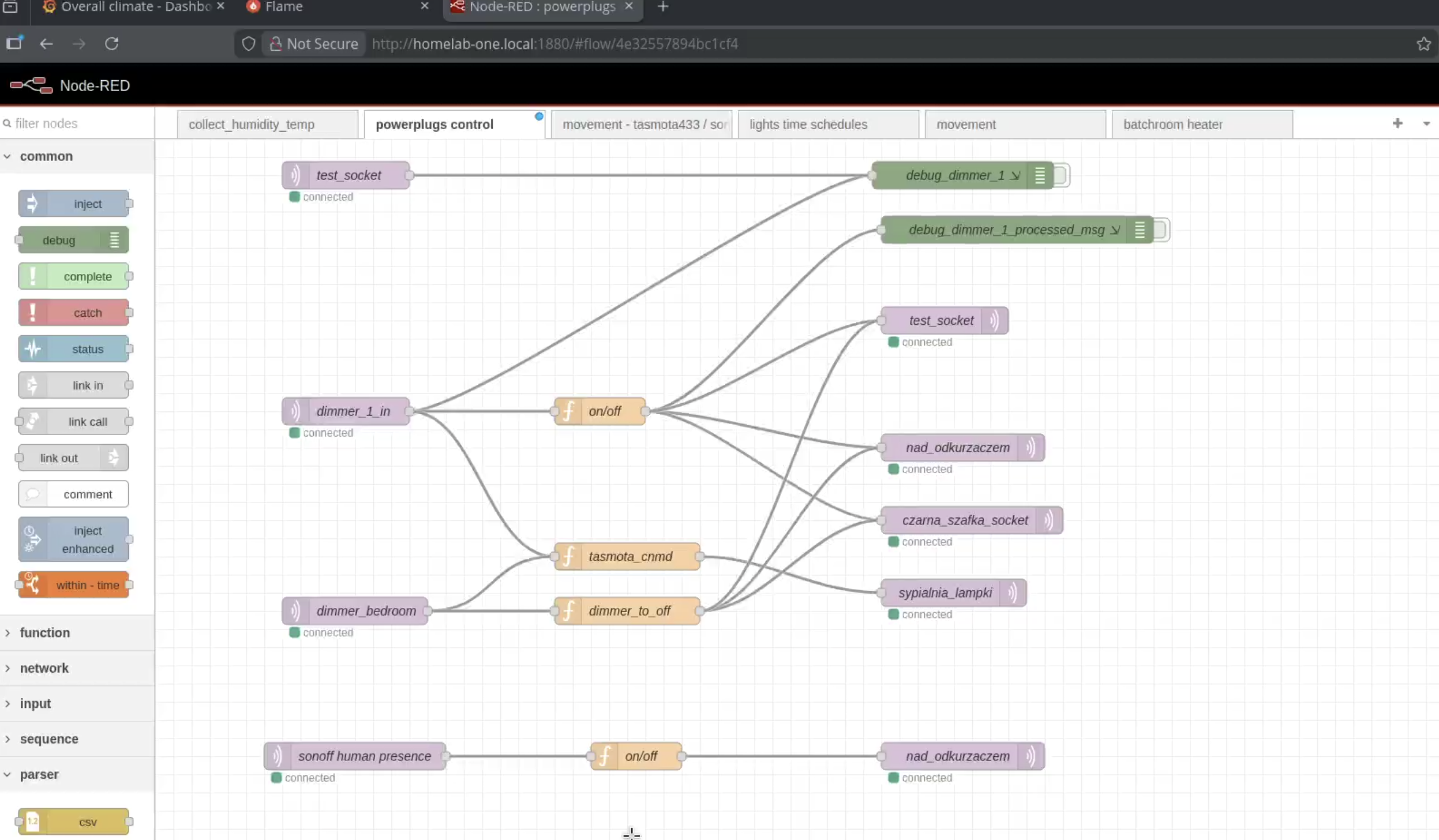
- powerplugs control - dimmer switches controlling IKEA power plugs (those are magnetic! you can attach them to your bed frame… so once you are there… you do not have to wake up any more, you can turn everything off with one “loooong press”, ha! told that I can make use of dimming events 😎)
- tasmota433 - handling 433mhz motion sensors
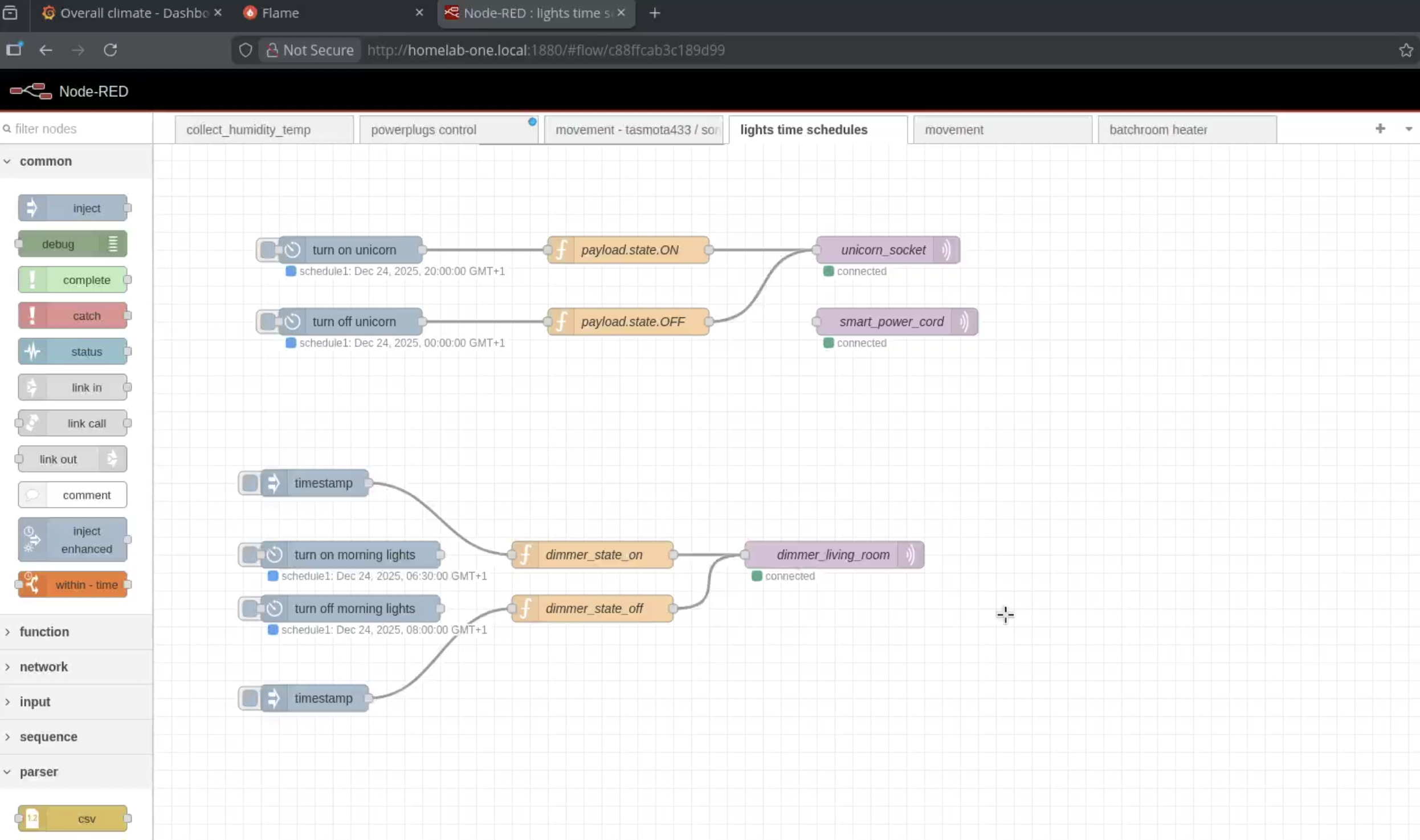
- lights time schedules - turn on/off lights based on time (unicorn lamp for neighbours 🦄)
- movement - motion-triggered lights
What I like about Node-Red is that you can see exactly what is happening with your data. No magic, just visual flows connecting inputs to outputs. And some very basic javascript for parsing msg payloads.
So as you see below… nothing fancy, rather ordinary simple, but it works. And it works since more than a year…
collecting humidity
power-plugs (lights) control
unicorn schedule 🦄
Grafana dashboards
Finally some visibility! I can see humidity levels across all rooms, temperature trends, battery status of sensors. And most importantly - I have proof that windows are being opened regularly.
OFC I was bit disappointed seeing that at certain moments there is actual proper correlation between window opening and humidity… but at the end less than landlord promised… so…
Take that, landlord! Everything below can be exported to excel 📊📈
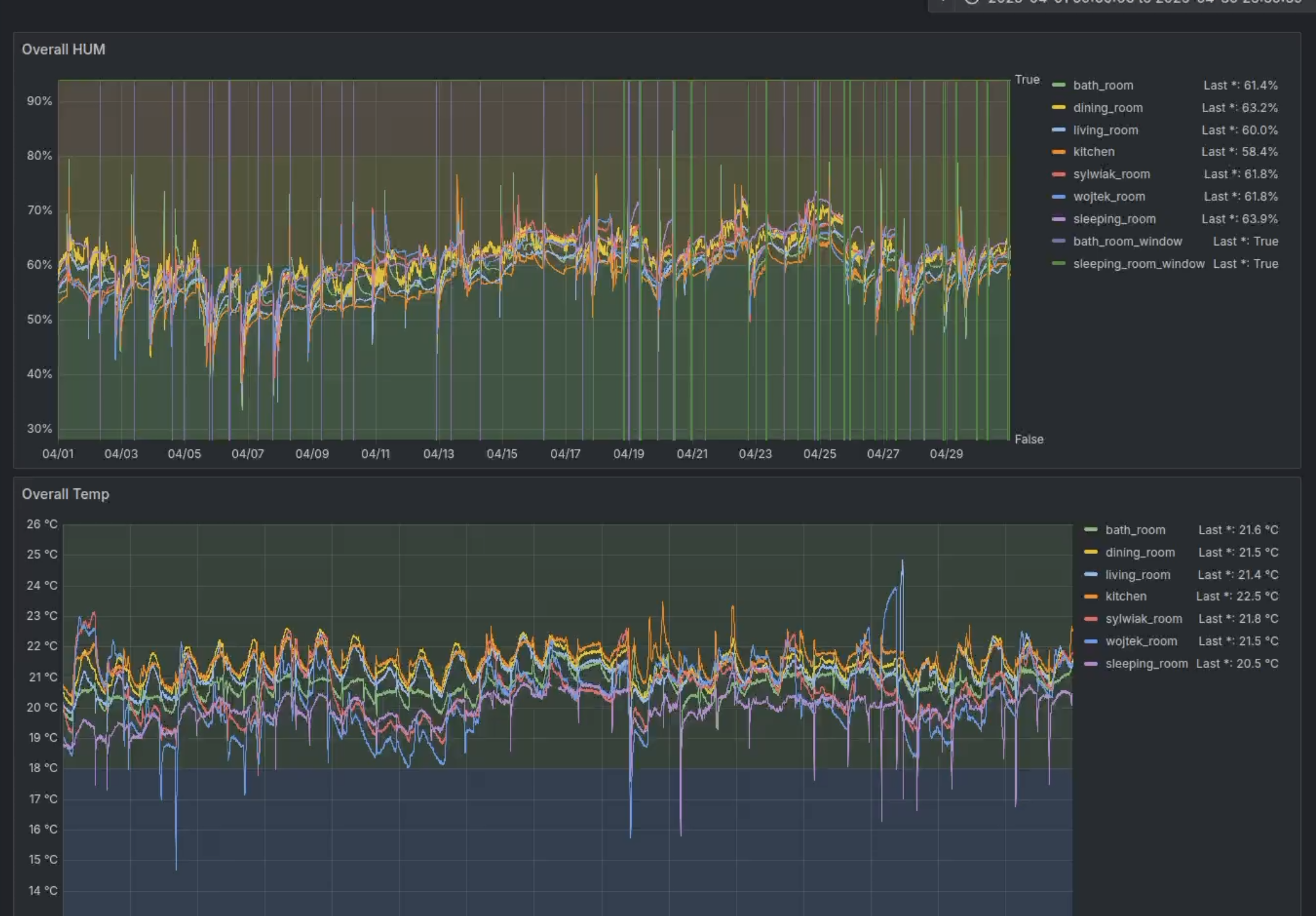
😔 disappointing correlation

What is missing
Backups
Yeah… this is embarrassing. Currently my only “backup” is git repo with docker compose file and some configs. If Surface dies tomorrow I would need to reconfigure everything from scratch.
Need to fix this. 👨🏻🔧
Secrets management
Passwords are in .env file. Token values hardcoded. Not great, not terrible. But should be better.
Since it just runs in my local network, not really a huge security risk… but still, nothing to be proud of 😒
Proper monitoring
Ironic that I work with monitoring stacks at work but my homelab has none. No alerts, no notifications when sensor battery is low, nothing.
😏 otel perhaps? How can I over-engineer this problem even more? 😏
Where I’m going with this
So this is where it gets interesting. Current setup works fine but I have bigger plans.
Network upgrade - Samsung laptop router
Before I can do anything serious, I need proper network. Currently everything runs through standard ISP router which is… fine, I guess. But no VLANs, no proper firewall, no fun. (plug and play and works… who would want that?!)
So I have old Samsung NP300V5A laptop that will become my OPNsense router. Plan is simple:
- Replace internal WiFi card with Intel i210 mini PCIe NIC (around €30 on eBay)
- Built-in Gigabit Ethernet becomes WAN port
- Intel NIC becomes LAN port
- Install OPNsense and configure VLANs, firewall rules, WireGuard VPN
For WiFi I have two Huawei AX3 (AX3000, Chinese version) routers. One will run in AP mode, connected to managed switch. Second one stays as backup or for different room if coverage is not enough. They support OpenWrt so I can flash it later if I want multiple SSIDs for different VLANs.
Network topology will look something like this:
flowchart TB
    internet["Internet (ISP)"]

    subgraph router["Samsung NP300V5A (OPNsense)"]
        wan["WAN (built-in GbE)"]
        lan["LAN (Intel i210)"]
    end

    subgraph switch["Managed Switch"]
        vlan10["VLAN 10 - Main"]
        vlan20["VLAN 20 - IoT"]
        vlan30["VLAN 30 - Storage"]
    end

    huawei["Huawei AX3 (AP mode)"]

    internet --> wan
    lan --> switch
    switch --> huawei

    huawei -.->|"WiFi"| devices["Phones, Laptops"]
    vlan20 --> iot["Zigbee2MQTT, Sensors"]
    vlan30 --> storage["FX-6100 NAS"]
Why separate VLANs? IoT devices should not have access to my main network. Storage should be accessible only from main network. Guest WiFi should be isolated. Basic security stuff that ISP router cannot do.
The sentimental storage box - AMD FX-6100
Ok, this one is not logical at all. I have old AMD FX-6100 system that I could just sell or throw away. But here is the thing - this was my first PC that I bought with my own money. Back when I was young and FX CPUs were actually new and exciting (yes, I’m that old 😅).
So instead of getting rid of it, I decided to give it new life as dedicated storage node.
Current specs:
- AMD FX-6100 (6 cores, 3.3GHz, no AVX2 unfortunately)
- Motherboard: ASRock 970 Pro3 (AM3+) with 6x SATA ports
- RAM: 16GB DDR3
- GPU: MSI N630GT-MD4GD3 (will probably replace with passive GT 710 for less noise)
What it will run:
- Debian + Docker (keeping it simple) or OpenMediaVault
- MinIO for S3-compatible object storage
- ZFS mirror with 2x 8TB HDDs
- Backup sync to Backblaze B2 (some simple cronjob doing sync)
The FX-6100 is not great for running containers - single thread performance is weak and no AVX2 means no modern ML workloads. But for storage? Perfect. It has 6 SATA ports, low power consumption when idle, and most importantly - it has sentimental value that cannot be measured in benchmarks 🖤 (first PC bought for money from my first internship).
Compute node - Clevo P640R
🖤 Second device I bought with own money 💸
For actual compute I have Clevo P640R gaming laptop. Much more capable:
- CPU: Intel i7-6700HQ (4c/8t, Skylake, has AVX2!)
- RAM: 32GB DDR3L
- GPU: GTX 960M (not really useful for this but nice to have)
This will be my k3s control plane. I’m even thinking about taking out the motherboard from laptop chassis and mounting it standalone with better cooling. Laptops are not designed to run 24/7 under load, but bare motherboard with proper fan could work much better.
Architecture v2.0
Here is the full picture of what I’m building:
flowchart TB
    subgraph infra["Infrastructure Layer"]
        router["Samsung NP300V5A<br/>(OPNsense router)"]
        ap["Huawei AX3<br/>(WiFi AP)"]
    end

    subgraph storage["Storage Layer"]
        fx6100["AMD FX-6100 Box"]
        minio["MinIO (S3)"]
        zfs["ZFS Mirror<br/>2x 4TB HDD"]

        fx6100 --> minio
        fx6100 --> zfs
    end

    subgraph compute["Compute Layer"]
        clevo["Clevo P640R<br/>(k3s server)"]

        subgraph k3s["k3s Cluster"]
            flux["FluxCD"]
            homelab["homelab-one stack<br/>(zigbee2mqtt, node-red, etc.)"]
            otel["OTEL Stack<br/>(prometheus, grafana, loki)"]
            postgres["PostgreSQL<br/>(CloudNativePG)"]
            immich["Immich<br/>(photo backup)"]
            traefik["Traefik<br/>(ingress)"]
        end

        clevo --> k3s
    end

    subgraph git["GitOps"]
        repo["Git Repository"]
    end

    repo -->|"sync"| flux
    minio <-->|"S3 API"| k3s
    router --> ap
    router --> storage
    router --> compute
Why separate storage and compute?
Few reasons:
- Different hardware requirements - storage needs lots of SATA ports and reliability, compute needs CPU power and RAM
- Independent scaling - can add more storage disks without touching compute, can add more compute nodes without touching storage
- Failure isolation - if compute node dies, my data is still safe on storage box
- Sentimental value - FX-6100 stays alive and useful 😊💪
FluxCD on storage box?
Actually, I’m now thinking - maybe I should run FluxCD source controller on the FX-6100 box. It would keep git repository data there, and storage is more reliable than compute node anyway. Something to experiment with.
k3s and GitOps
Current docker compose approach is fine for small setups but doesn’t scale well. With k3s I get:
- Proper secrets management (SOPS, sealed-secrets, or external-secrets with Vault)
- GitOps with FluxCD - everything declared in git, automatically synced to cluster
- Easy horizontal scaling when I add more nodes
- Real ingress with Traefik and proper TLS certificates
Yes, it is overkill for home automation. But this is also my learning playground. I work with Kubernetes at my day job and having homelab to experiment with is priceless.
Also I’m planning to get away from google photos and stop paying for google one, so me and my wife will start using home network for storing files, sharing photos, storing nice media library.
Summary
So that’s my homelab journey so far. Started with simple goal - prove to landlord that I do Lüften properly. Ended up with docker compose stack monitoring humidity across entire apartment.
And now I’m planning kubernetes cluster with proper network segmentation and distributed storage because… why not? 🤷
If you have questions or want to see specific parts in more detail, let me know. Repository with current setup is here - it’s messy but it works.
Cheers! 🍺
ps. surface will get new life as well… looks like I will make myself nobara tablet 🤩